Green means accepted: ArgoCD health checks for kgateway
Duncan Doyle
Nov 12, 2026
GitOps is a natural fit for kgateway: Gateways, routes and policies are all Kubernetes resources, so they live in Git, and ArgoCD keeps the cluster in sync. ArgoCD does more than applying manifests. It also asks every resource whether it is healthy, and that answer drives the Application’s status, sync waves and notifications. Today I’m happy to introduce ArgoCD health checks for kgateway, so ArgoCD can give that answer for kgateway’s own resources too.
These health checks are a separate open-source project in the kgateway-argocd-healthchecks repository. They are currently not part of ArgoCD or kgateway, and no ArgoCD release includes them. You add them to your existing ArgoCD installation yourself.
Health for kgateway resources
ArgoCD knows how to check the health of a Kubernetes Deployment or a Service, and recent releases also ship checks for Gateway API resources, such as Gateways and HTTPRoutes. Kgateway’s own custom resources had no check yet, so ArgoCD left them without a health status and did not count them when it rolled up an Application. A TrafficPolicy that kgateway rejected could sit in an Application that still reported Healthy.
The new health checks close that gap. They read the status kgateway already writes on each resource, and turn it into one of ArgoCD’s states:
- Healthy: kgateway accepted the resource.
- Progressing: kgateway has not reached a verdict yet, for example right after a change.
- Degraded: kgateway rejected all or part of the resource. The badge shows kgateway’s own message, such as which reference it could not resolve.
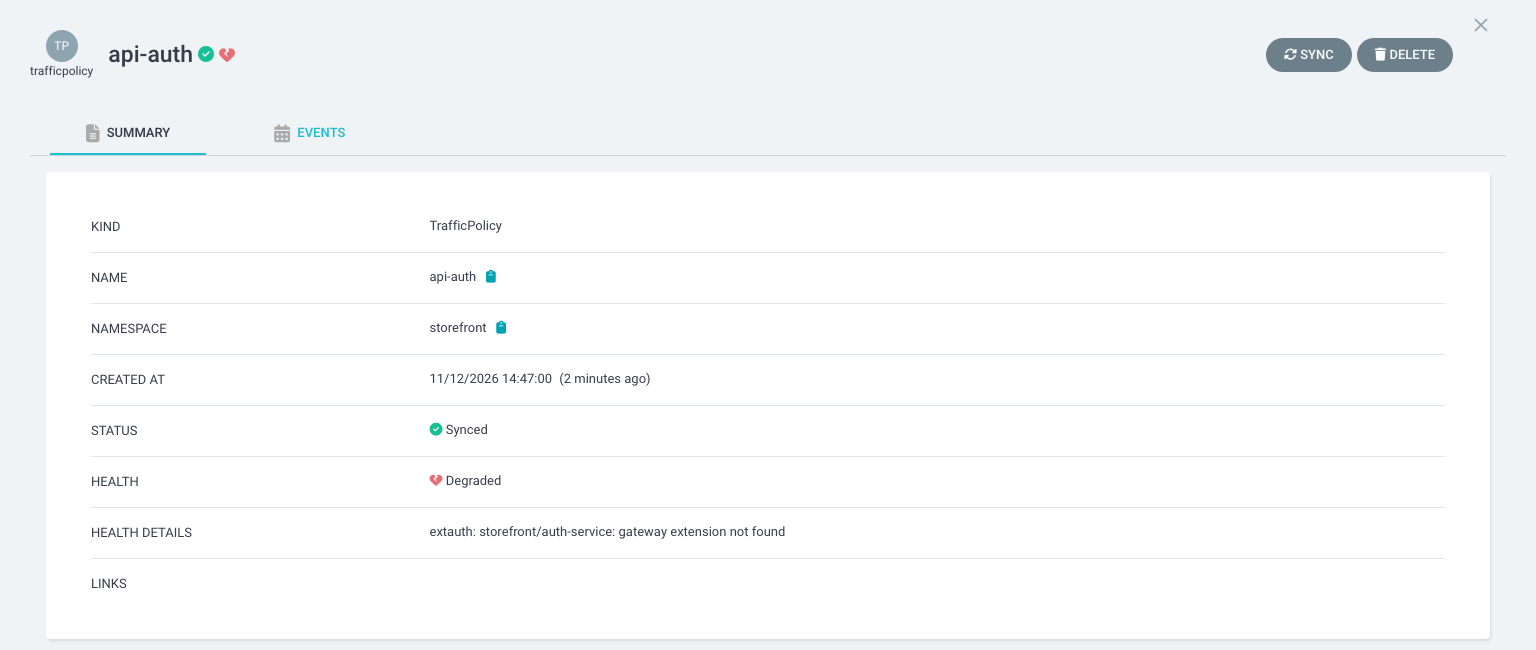
Here is what that looks like for a small storefront application. Almost everything is green, and ArgoCD now points straight at the two resources that need attention. In this example, it shows a route where the backend Service was never deployed, and a TrafficPolicy that references an auth extension that does not exist.
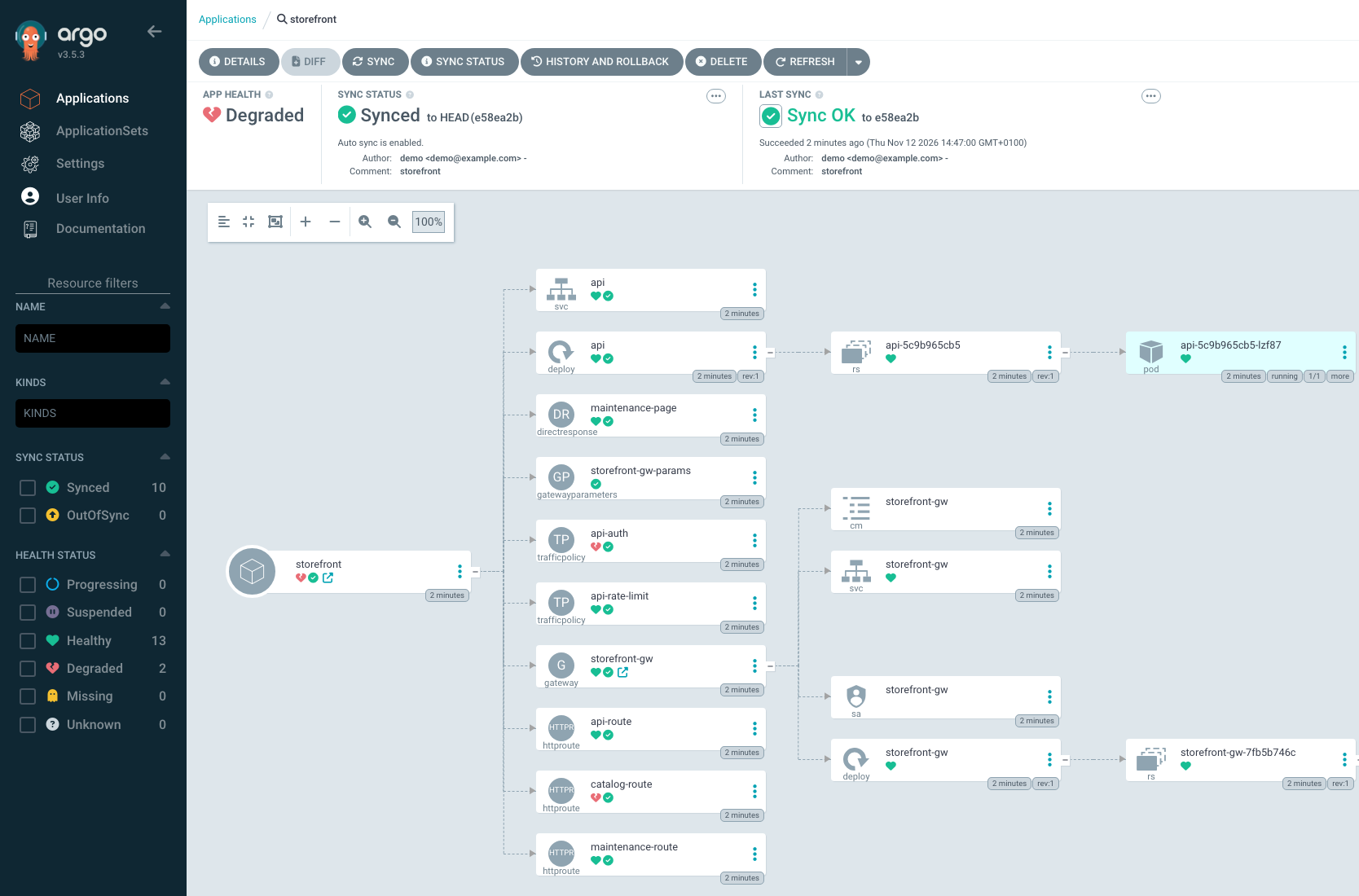
Select a degraded resource and ArgoCD shows the health status of the resource in kgateway:
What is covered
The health checks cover the kgateway resources that report a status:
| Kind | What it is |
|---|---|
| TrafficPolicy | Route-level traffic behavior, such as auth, rate limiting, and header changes |
| ListenerPolicy | Listener-level settings on a Gateway |
| BackendConfigPolicy | Connection settings for a backend |
| DirectResponse | A pre-defined response that is returned by the gateway |
| Backend | A destination that is external to the cluster |
The health checks are tested against kgateway v2.4 and v2.5. For Gateway API kinds like Gateway and HTTPRoute, ArgoCD 3.1 and later include their own checks, so together you can monitor the health for the whole gateway configuration.
Getting started
The health checks are a small set of Lua scripts that you add to ArgoCD’s argocd-cm ConfigMap. No deployment or restart is necessary. If you install ArgoCD with the argo-helm chart, you pass an extra values file that contains the checks. Otherwise you can update the ConfigMap with the kubectl patch command directly. Hosted ArgoCD offerings that accept health customizations can take the same entries.
You can find everything that you need to get started in the kgateway-argocd-healthchecks repository. The installation guide walks through each installation method, and an in-depth appendix explains exactly how each state is decided.
What’s next
ArgoCD health is one piece of a bigger goal: making kgateway easy to run with confidence in large production environments, where many teams share gateways and changes flow through automated pipelines. The kgateway team is working on more management and observability features in that direction, so that you always know what your gateways are doing and why. Give the health checks a try, and let me know what you would like to see next on the kgateway Slack.